
Colemak-DH on a 40% Split
From my understanding, a lot of people are drawn to Colemak (and the many variations upon it) for its ergonomic benefits as a preventative measure for some wrist-trouble, or something like that. I do experience some minor shoulder pain (on the left side), but I do not find it to be a make-or-break issue for my productivity. And to be completely honest, I have no complaints with QWERTY and I can touch-type just fine; so this is a rather poor advertisement for adopting any new keyboard layouts. They often ask: “who even uses Colemak anyways?” and the answer is almost always “not anybody who actually needs to,” and that includes me.
Why did I switch? Because I wanted to challenge myself and use a weird peripheral. Is that a good reason? For me, yes, it’s valid enough (LOL).
I switched to Colemak-DH in the spring. The first month took me to roughly 50 WPM, which was an unpleasant start, yet I kept pushing. Now, three or four months on I sit at ~90 to ~100. My QWERTY is 120. I am still measurably slower on this keyboard than I am on an ordinary one. But I have no intention of going back. I’ll explain why shortly.
This whole process was kicked off by a purchase: I bought a Cornix LP from JezailFunder (a pretty silver-cased 40% wireless split @ ¥29,500) and then took the opportunity to relearn how to type along with the new column-staggered hand placement. Loving the board also brought a love for the Colemak-DH (as I used exclusively with the board). The process of going from 104 keys to 42 also forced me to consider how to most effectively design a keymap tailored to my needs.
Why Colemak-DH
Below I’ve got (3) different heatmaps which show off the difference between QWERTY, Colemak, and Colemak-DH in order to best illustrate the keypress distributions for each:
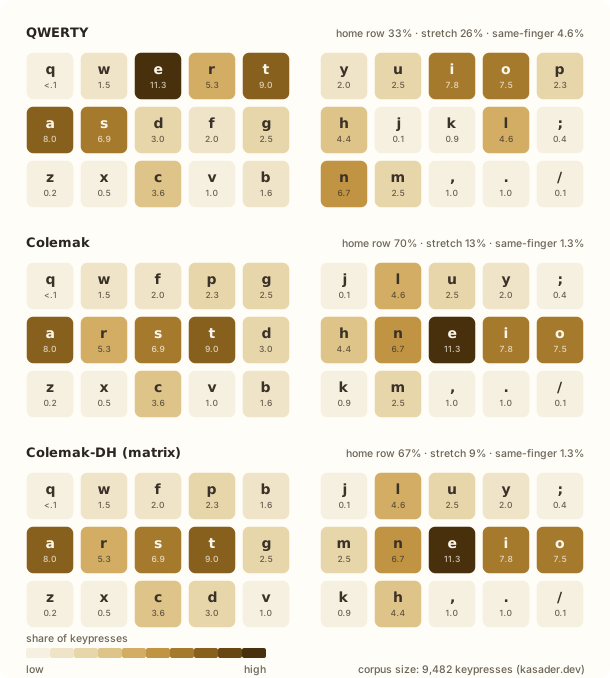
The mod has two different forms depending on whether your rows are staggered like a typical keyboard (typewriter-style) or stacked in columns; a column-staggered board like the Cornix takes the matrix version, which is pictured above.
QWERTY places about one-third of English keypresses on the home row; Colemak/Colemak-DH puts about two-thirds of them there. Very uncomfortable same-finger bigrams (one finger asked to hit two different keys in a row) fall from ~4.6% to ~1.3%.
A clear example of same-finger bigrams you might not notice is the typing of regular past-tense verbs in QWERTY by making your left-middle finger hop from E on the top row down to D on the home row (-ED). On either Colemak variation those two letters are on opposite hands.
DH-Mod Changes
On both measures of home-row and same-finger bigrams, Colemak-DH is actually fractionally worse compared to stock Colemak; the value proposition is made in reducing the number of “stretch” keypresses instead.
D and H are frequent letters, and stock Colemak places them in the two inner columns, where your index fingers reach them by splaying sideways. Mod-DH swaps them for the far rarer G and M keys, and allows you to curl your fingers down instead. This is the common layout adopted over stock Colemak for ortholinear/column-staggered keyboards because the key-column alignment actually reduces the total finger travel-distance for home-row VS stretch keys.
With the mod, the typing that needs a sideways reach drops from ~13% to ~9%. That is the whole modification. Again, the primary incentive for this only stands as valid for boards which can take advantage of this.
One thing did get worse. My right pinky went from ~2.7% of keypresses to ~7.9%, because O and ; both live in its column now. That is nearly triple. It bothers me less than the number suggests though, because I have since mapped a second ; onto a separate layer (which I will get to later).
Key Rolling
It is a phenomenon you cannot explain without first experiencing it firsthand (try listening for the distinct “rolling” sounds in this person’s typing). Rolling while typing is one of the most satisfying aspects of the Colemak layout. It is just the stacking of bigrams and trigrams (which Colemak is heavily optimized for) in typing.
For example: ST is left-middle & left-index, two adjacent fingers on two adjacent keys, so when you type it, it becomes one distinct “rolling” motion rather than two. NE is the same on the right hand. ARST and NEIO are the whole home row under four fingers in order. Typing starts feeling like the keys are falling over like a sequence of dominos. It is really an indescribable kind of pleasure (raaahhhhh).
Learning Colemak-DH
| WPM | Share of QWERTY | |
|---|---|---|
| QWERTY, then and now | 120 | N/A |
| Colemak-DH, after one month | ~50 | 42% |
| Colemak-DH, after three to four months | 90 – 100 | 75 – 83% |
The first month is quite rough, and no amount of forewarning prepares you for the indignity of it. You lose the ability to think and type at the same time, because the part of your brain that used to handle spelling has been dragged into finding the letters in a big mental space which holds the keymap in your mind. Hell.
Then, ~50 WPM at a month is roughly the point where the layout stops being the bottleneck and your thinking becomes the bottleneck again (which is the only threshold that actually matters). Everything after that has been a slow accumulation. Despite not running through daily typing drills the number keeps drifting up on its own.
Maintaining QWERTY
I have been asked if I ended up losing QWERTY in this transition, and the answer is that I did not. Losing QWERTY is too high of a cost to bother with this at all if that were actually the trade being made, nobody wants to permanently handicap themselves for what could end up being almost no benefit, but I digress.
Thankfully, I did not lose any of my WPM in QWERTY compared to when I started; and I suppose that this is due to an active/intentional logical separation that I maintain between the physical keyboard styles and the key layouts that I use with them. I’ve written my Cornix keymap into the board’s flash memory (see: Vial.rocks), so there is no required config and/or per-machine setup.
Doing It in Software
The flip side is that the layout does not travel: my laptop keyboard is QWERTY, and every other generic borrowed keyboard is QWERTY.
This could sound like a limitation, maybe, but I maintain that it is the opposite. MacOS ships with Colemak pre-installed but not Colemak-DH, so doing this in software would mean maintaining a custom layout on every machine I touch and then, like, hastily swapping out the keymap configuration to QWERTY and like stumbling around the settings with my cursor like a fool, if anybody tries to use my machine (I also maintain a toggleable layer on my Cornix which provides QWERTY input for anyone who needs it).
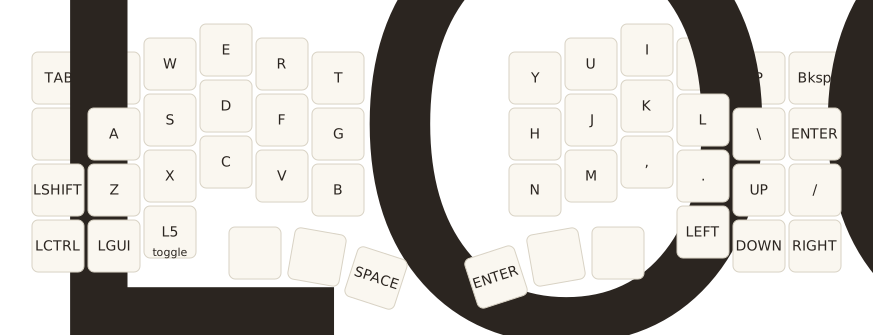
L5 key. Almost exclusively for people who want to try typing on my board (they don’t know Colemak-DH).Thus, really, keeping it within the hardware is less work by a massive margin.
Two Layouts at Once
“People have reported success in […] maintaining both layouts. I’ve heard of people using psychological hacks to assist with the context switching, for example, using Qwerty on a traditional row-staggered board, and Colemak(-DH) exclusively on an ortholinear. Or, using one layout at home and one at work.”
If anyone is worried about the confusion that might come along with knowing multiple layouts, listen to this: my hands seem to mentally compartmentalize each (QWERTY/Colemak-DH) with the keyboard rather than under one slot marked “typing” (it is very similar to knowing multiple languages. If someone spoke to you in French, you wouldn’t respond in Chinese). I have never once had to think about the changeover, and maybe you won’t need to either.
Using a Split Keyboard
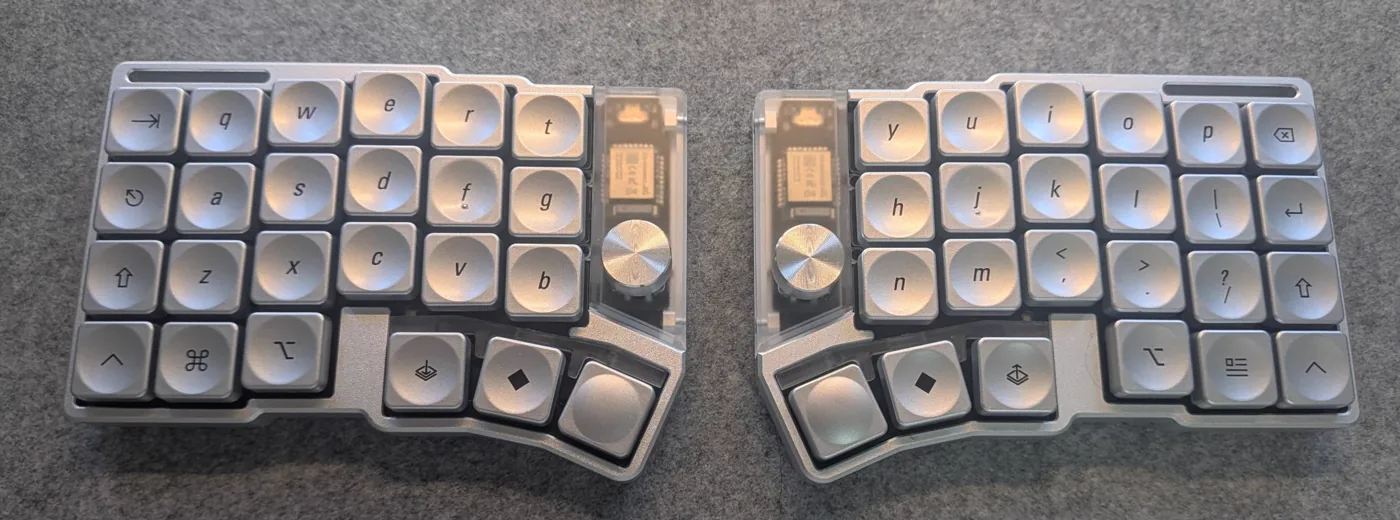
The Cornix LP is a 40% split with an aluminium case, an FR4 plate, Kailh Choc V2 switches, a rotary encoder on each half, and a 650 mAh cell per side. It runs over also Bluetooth for up to three devices. It’s really quite the awesome piece of custom keyboard tech for the price.
It ships on LAK PBT caps which are perfectly good, and I replaced them anyway with a set of LCK Liquid Silver at ¥4,900. They are low-profile with a dished centre and a properly metallic finish; against the silver case the whole board looks like a serious bit of equipment. (Both the caps and the board keep drifting in and out of stock, so temper your expectations before you click.)
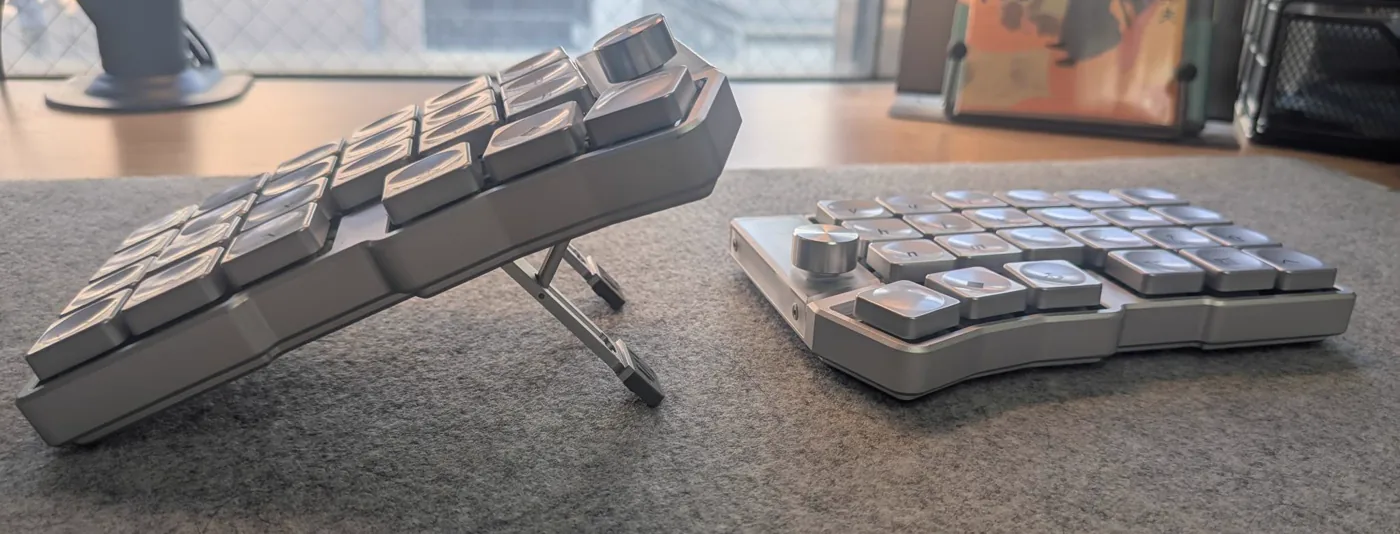
The best sleeper feature of the Cornix is that the tenting folds out of the board itself. There are two machined struts under each half with four notched positions (6°, 12°, 18°, and 24°), so there is nothing extra to buy. On most splits tenting is an aftermarket problem you solve with pucks or printed wedges, and because that costs money and effort you tend to pick an angle early and then stick with it. Being able to change mine in ten seconds meant I spent a lot of time experimenting (I am personally a 6°/12° guy).
Custom Mod Layers
Forty-eight keys is not enough keys (if you noticed, there is no number/symbol row, arrows keys, function keys, etc). There for everything has to go somewhere you decided to put it.
For this Cornix runs Vial, which is a QMK fork with a GUI that writes to the keyboard while it is running, and there is a web version that needs nothing installed at all. You change a key and it updates immediately (if there was a compile-and-flash cycle in between I might’ve given up on the board, honestly, that how much you end up editing your keymap). If you put a key someplace and it absolutely sucks, you usually need a day or two to make that call.
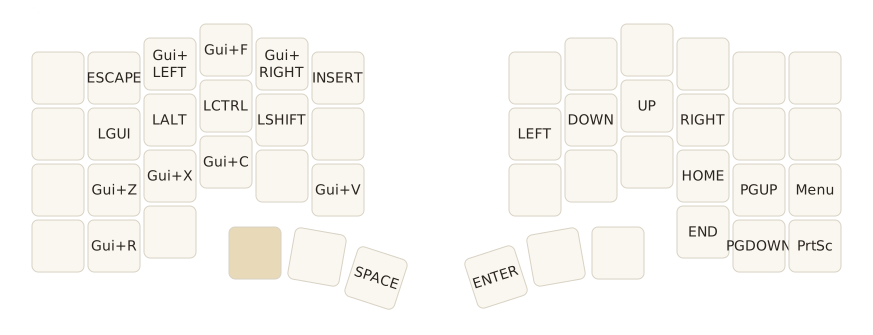
h,j,k,l) become the arrow-keys, and the shortcuts are on the left hand.Home Row Mods
I’ve also hopped in on using home row mods (I feel that home row mods users online love to proselytize about it, so I’ll keep it short here). For those unfamiliar, they make the home row do two jobs: tap it for the letter, hold it for a modifier. So A R S T and N E I O are also GUI (◆), Alt (⎇), Ctrl (⎈) and Shift (⇧), mirrored outward from the index fingers. Ctrl+C becomes two middle fingers on opposite hands, both of which are already resting where they need to be. There are lots of opinions on which home-row keys should be mapped to where, but I use GACS (◆⎇⎈⇧).
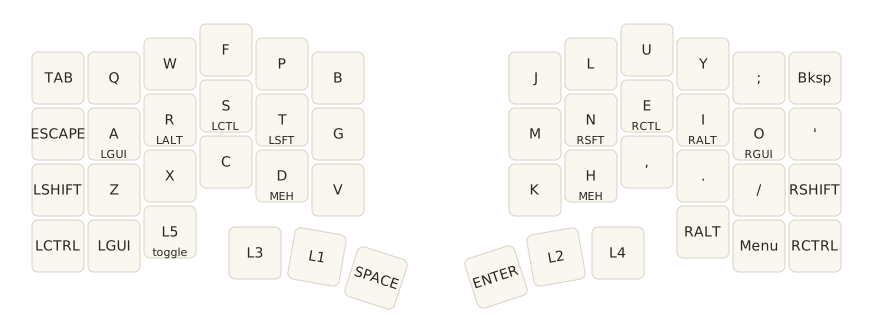
QMK calls this a mod-tap, and Vial exposes it directly. The difficulty is all in the timing: how long a hold has to be before it counts as a hold, and what happens when you roll from a modifier into a letter faster than the firmware expected. This is a solved problem and you should not try to solve it yourself. Precondition’s guide to home row mods is the defacto reference; reading it first will save you a lot of wasted time, so please, read the whole thing if you decide to use them. You’ll end up very upset and unable to type anything if you don’t configure it right.
Combos & Chords
Vial calls chords combos: press N keys at the same time, get out whatever mapping you set. An example of one I’ve set is H and , for backspace.
The choice of pair is not arbitrary, and I only worked out why after picking a few bad ones. On Colemak-DH, H and , sit next to each other on the bottom row under the right index and right middle fingers, so they are on the same row and in adjacent columns but on different fingers. You can press that as a single motion, the way you would tap two adjacent piano keys. A pair on the same finger means rolling one finger across both keys, which is doable but slower, and a pair spread across rows or hands is really just two keys pressed carefully, which is slower than whatever you were trying to avoid in the first place.
Using a Trackball Mouse
The other thing a split gets you is a hole in the middle of your keyboard, and I put a silver Kensington SlimBlade in it.
Nobody really advertises this as a benefit of going split. On a normal keyboard the mouse lives out past the number pad, so using it means picking up your whole right hand, moving it eight inches over, and then finding the home row again by feel afterwards. With the halves pushed apart the pointer sits inside the keyboard, roughly where G and H used to be. My hands barely move.
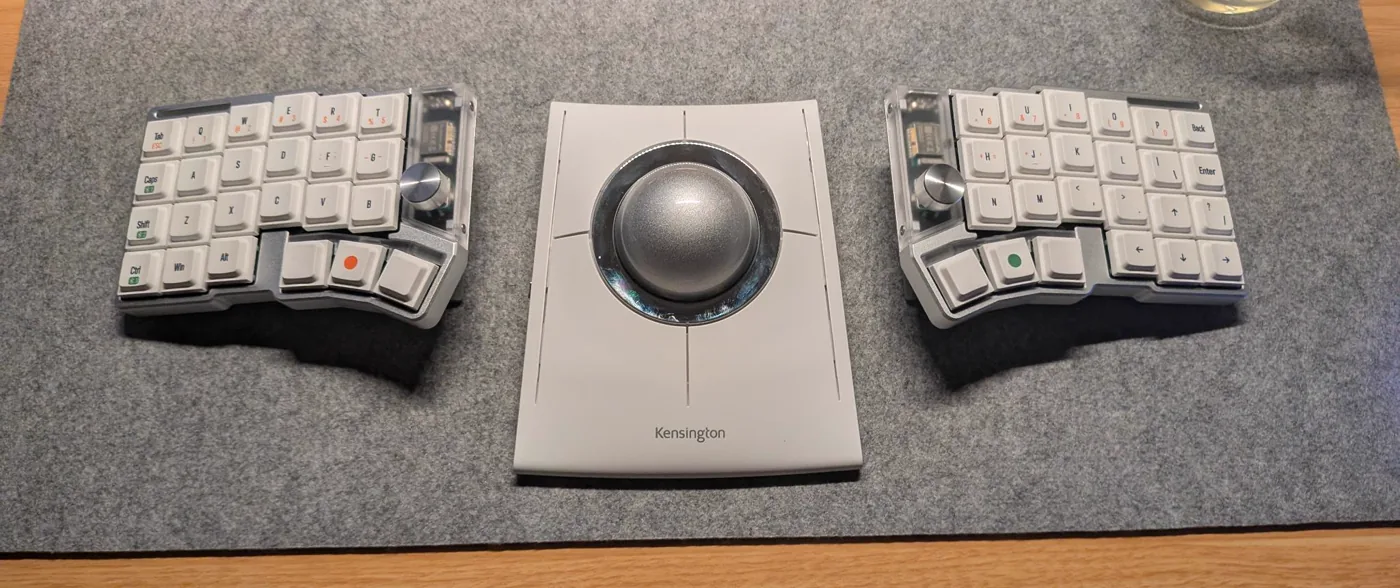
A trackball is a sphere instead of a moulded right-handed shape, so its perfect for ambidexterious use. I use it with either hand more or less at random convenience, which spreads a load that used to be entirely my right wrist’s; and you know what, I never really thought about how the mouse is exclusive to the right-hand. It’s quite strange that it is, and that mice are molded to the right-hand as a given (but that is a complete aside). Anyways, I essentially bought it because it was cool-looking, fit the split, and it matched the aluminum-finish on board (LOL). I later found lots of additional benefits from having used it but I will save that for another day, maybe. This YouTube video pretty cleanly summarizes my thoughts though (Japanese language warning).
Resources Worth Bookmarking
- Colemak Mod-DH: the source of truth for the mod, including the matrix and angle variants and the reasoning behind each.
- A guide to home row mods: Precondition’s guide, and the only one you need. Read it before you configure anything.
- Vial: the firmware and the GUI. The combos manual is short and worth ten minutes.
- keybr: teaches a new layout letter by letter rather than throwing the whole alphabet at you on day one. This is what got me to 50 WPM.
- Monkeytype: for measuring, once you can bear to look.
Takeaway
Erm, well, I am still ~20 WPM slower on the Cornix than I am on a QWERTY keyboard, but I have stopped caring about that. Speed was just the thing I could measure, so it became the thing I measured; but that isn’t too important to as much as it was anymore. What actually changed is that my hands no longer really go anywhere. Two thirds of my keypresses land where my fingers already are. It’s very comfy, and the rolls are addictive. It makes typing fun.
At the end of the day, though, I know that I could have kept QWERTY on this board and still gained most of what I did. Most of the work was done by the 48-key constraint and by the QMK firmware that made me so engaged in the project of switching over; the rest was a couple of months of patience and gaining the muscle memory. In short: I love Colemak-DH. I love my Cornix. And I love you, reader. Thanks.